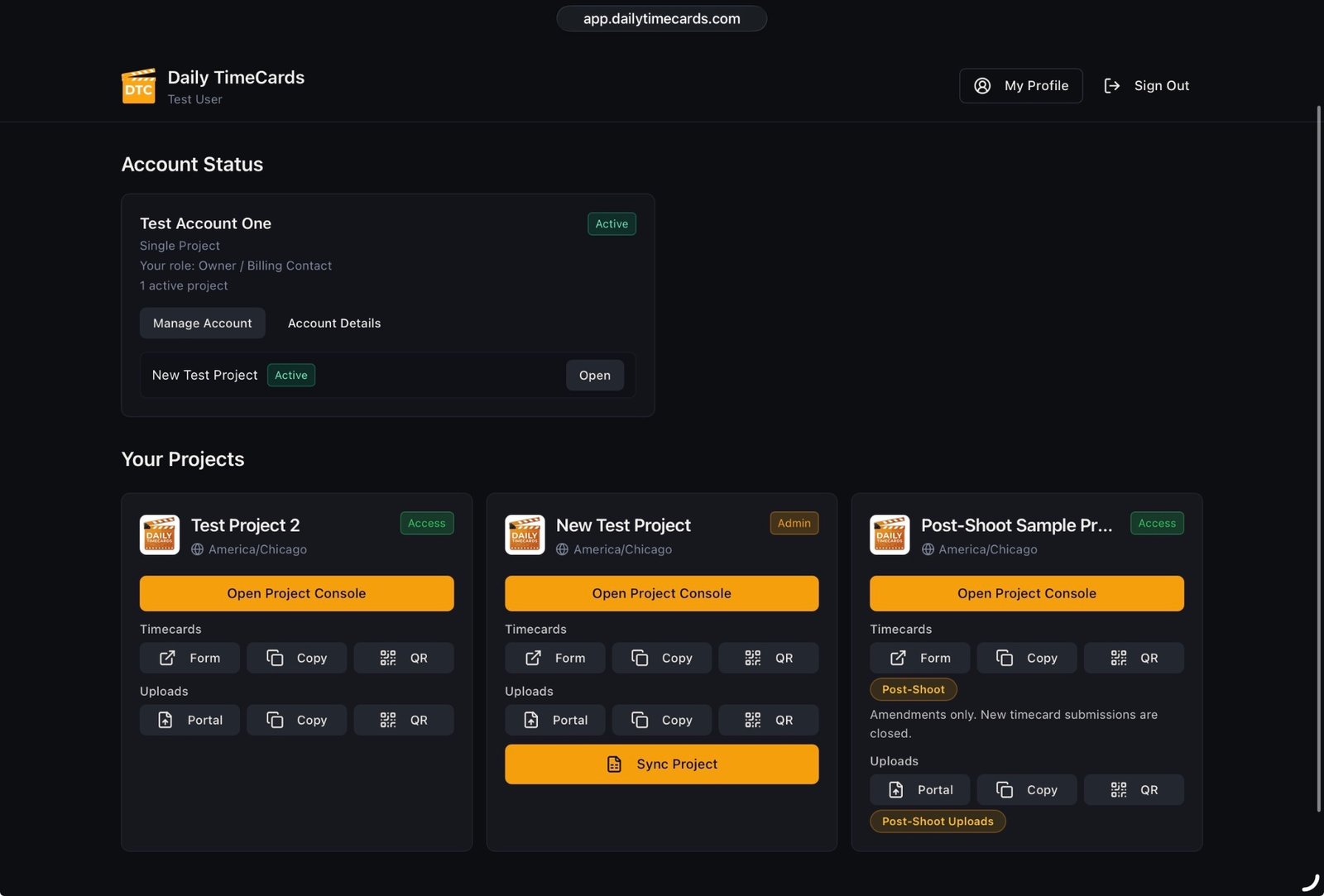
Account status and details
A clear read on your account before you open anything: your role, your current status, the account you belong to, and where applicable how much active project capacity your account covers.
- Your role and account status are shown in plain language, so you always know the level of access you are working with.
- Where your account includes active project capacity, the dashboard shows how that capacity currently stands.
- Account details sit alongside that status, so you are never guessing which account a production belongs to. That matters the moment more than one production is running under the same account.
Your Projects
Every production you have access to, presented as project cards you can open directly.
- Each project appears as its own card, so switching between productions is a single deliberate action.
- Opening a project card takes you into that production's Project Console.
- You only see the productions your access covers.
My Profile and account management
Your own details, kept separate from project-level configuration, plus account management for the users authorized to use it.
- Your profile is yours across every production you work on.
- Account management is surfaced only for users who are authorized to use it, so the screen stays uncluttered for everyone else.
- Project-level configuration lives in Settings, and per-user notification preference lives in Users.
Ending your session
A clear, always-available sign out, which matters on shared production computers.
- Sign out is deliberately visible rather than buried in a menu, because production offices share machines.