Crew Documents

Daily production paperwork, submitted through a public upload link and kept with the production instead of scattered across text threads.

Crew Documents

Inside Crew Documents

Pick any area below to read exactly what you can do in it.

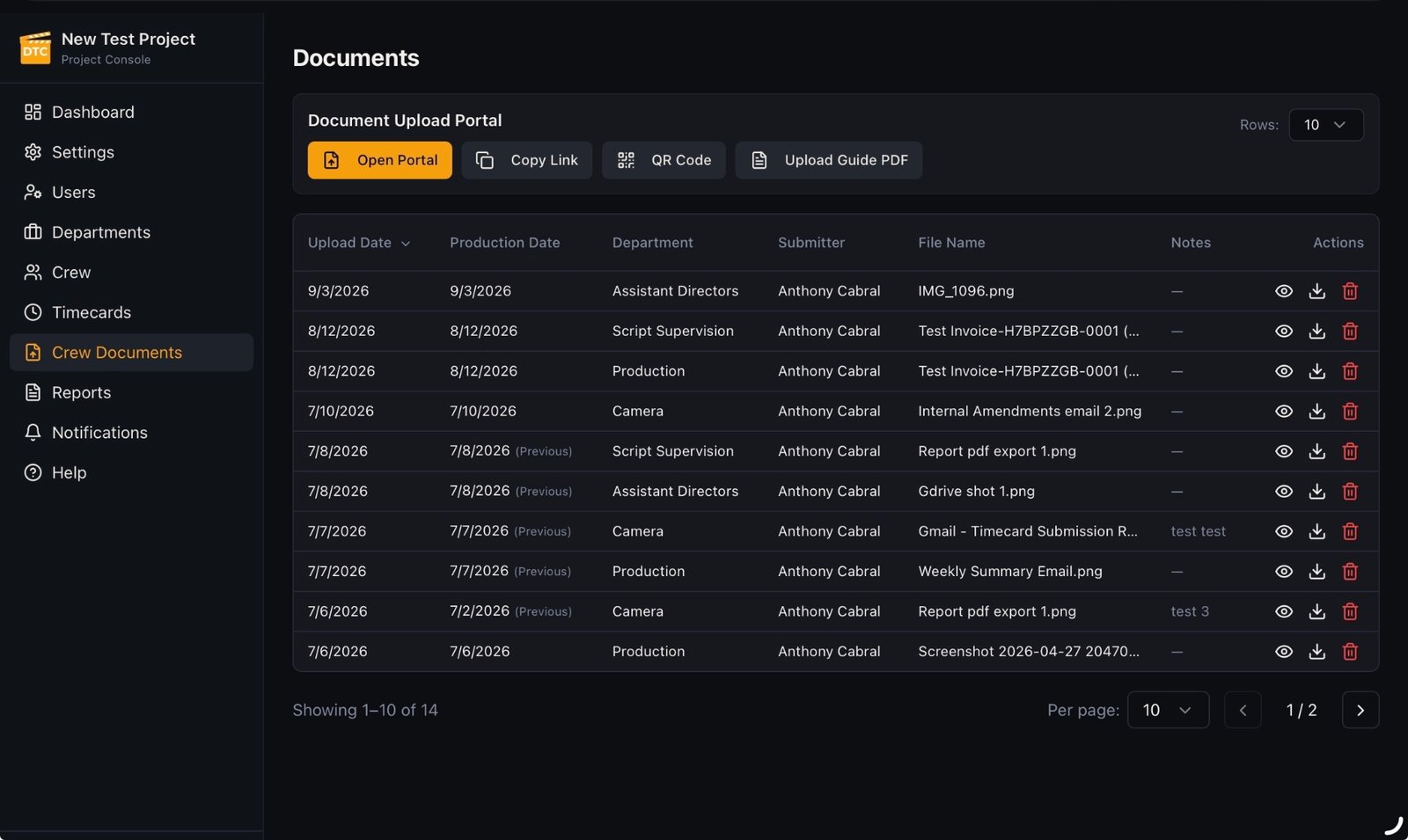
Crew Documents browser inside the Project Console showing the Document Upload Portal, document list with upload and production dates, departments, submitters, file names, and actions

What you can do here

Public Crew Document Upload

Crew and department heads upload through a public link or QR code shared from the Project Console, with no account required.

  • The upload entry point is public on purpose: paperwork should not wait on an account.
  • Sharing controls for the link and QR code live in the Project Console.
  • Everything submitted arrives attached to the production.

Where production paperwork usually gets lost

On most shows, a call sheet note, a signed form, or a receipt gets photographed at the truck and sent to whoever asked for it. It lives in one person's phone until someone needs it weeks later. Uploading it instead puts that same photo into the production's own record on the day it was taken, which is where the office will actually look for it.

  • The sender does not have to know who in the office needs the file.
  • Nothing depends on one person still having the message thread at the end of the run.
Crew Document Upload form on a phone, showing production date, department, and file selection